Home/Product/Estimate & Budget
Estimate & Budget
Price It Before You Sign It, Then Watch It
The estimator starts from the project's own workstreams and turns them into hours, price and margin. When the numbers are right, one button writes them into the plan and the budget, and from then on the budget watches the same planned hours against what actually happened.
Estimator
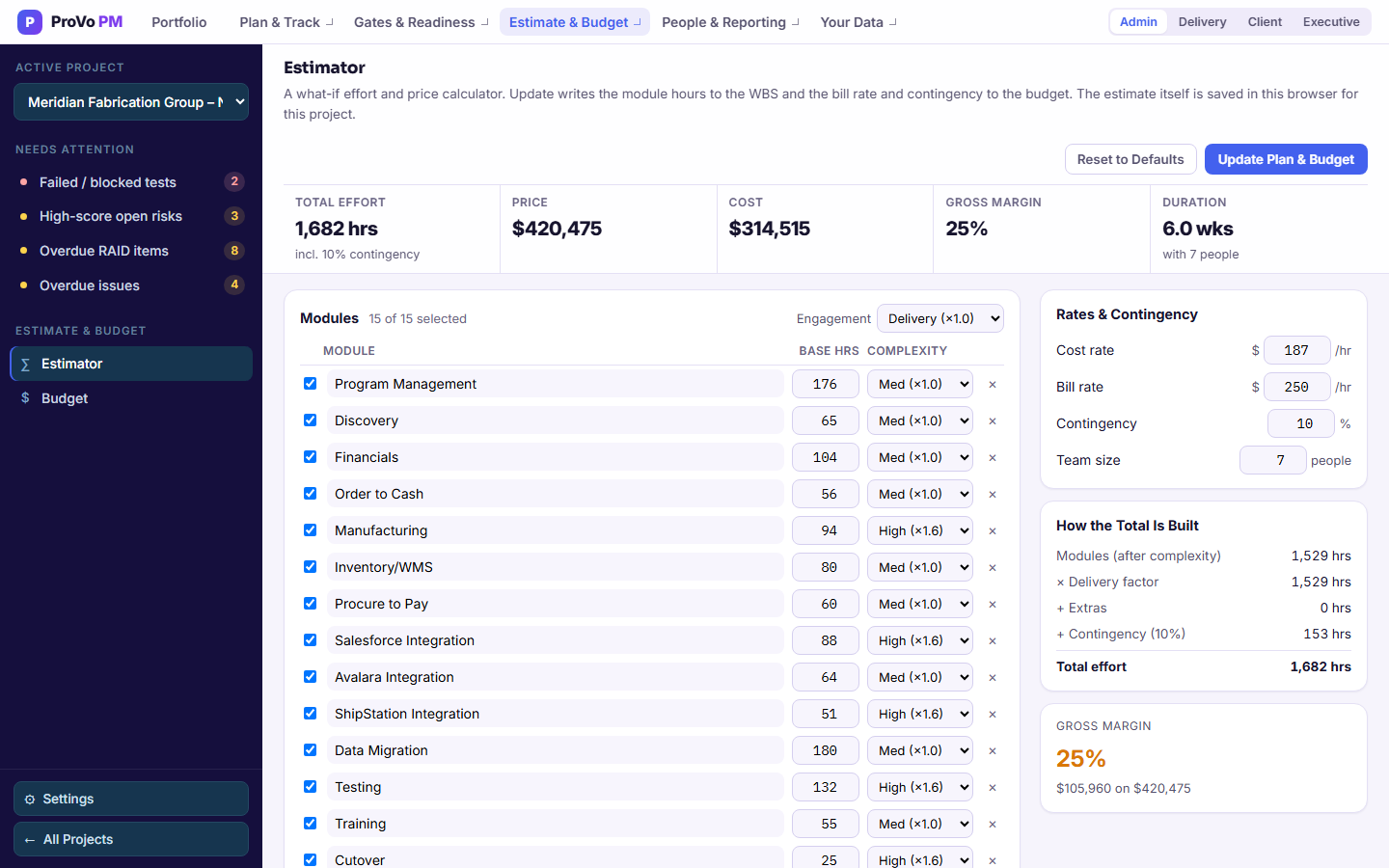
One module per workstream in the project's WBS, each with base hours and a complexity you set: low, medium or high. Rename, add or remove any line. Extras for travel, training, extended support and change requests are there to switch on. A project with no WBS yet starts from a general ERP module list instead.
- Workstreams and complexity in; hours, price, cost and duration out
- Advisory or delivery engagement, with advisory at 0.7 times the module hours
- Cost rate, bill rate, contingency and team size, so you see gross margin, not just a total
- Update Plan & Budget previews the change, then writes module hours to the WBS and the bill rate and contingency to the budget
- A suggested phase breakdown taken from the project's own phases
Budget
Set a rate, hours per day, and expense and scope contingency once. The budget takes the planned hours already in the WBS and applies your assumptions to them, with no second model to maintain.
- Total budget, actual cost and budget consumed, live
- One hourly rate you set, or the bill rate written from the estimator
- Forecast at completion, extrapolated from the current burn rate
- Planned and actual cost by phase and by workstream, and planned cost by person
- Exports to PDF, and shows only to roles with Financials switched on
Budget
Your Assumptions, and Then Arithmetic
The budget tab does not ask you to maintain a second model. It takes the planned hours already in the WBS and applies your assumptions to them.
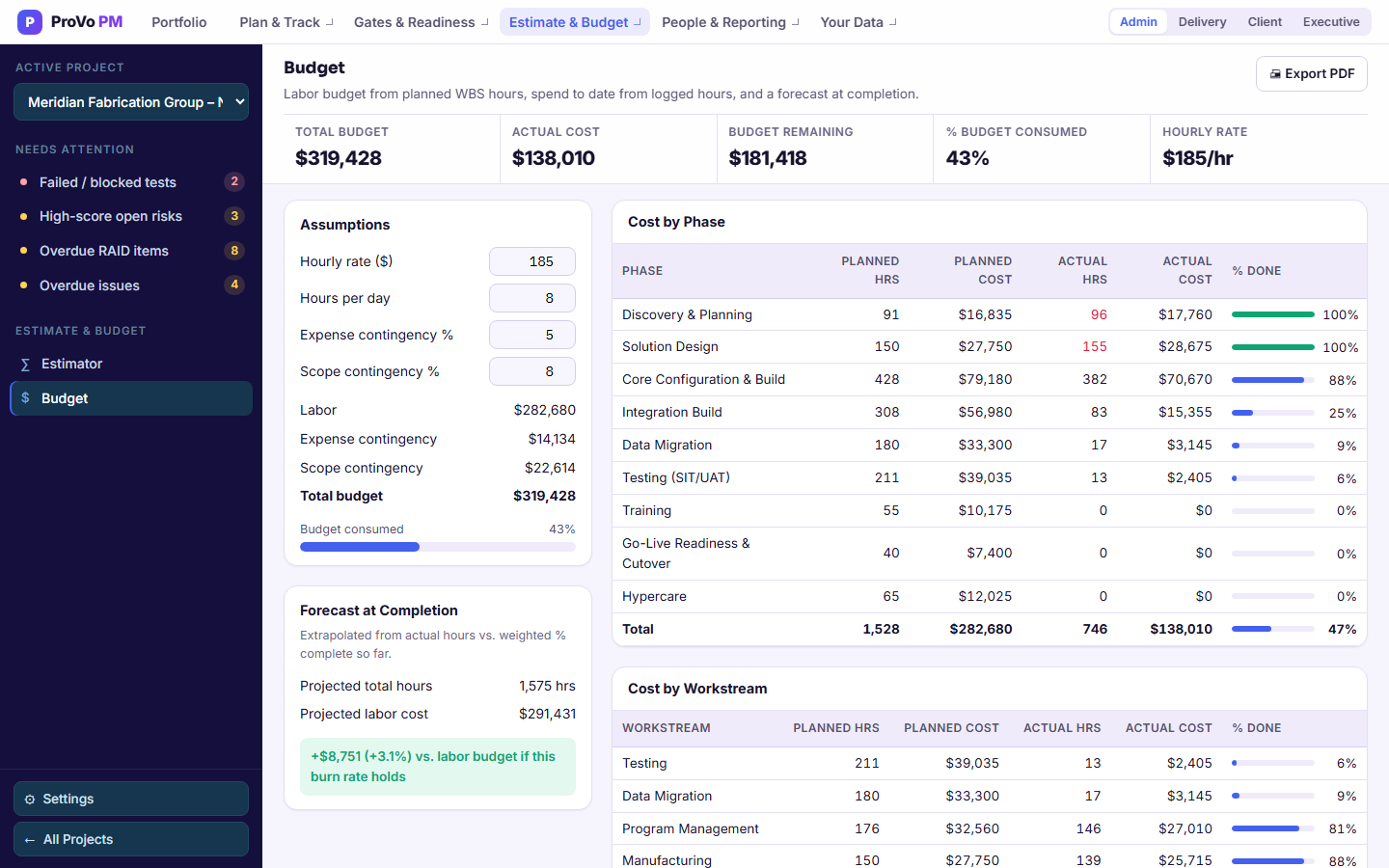
| Line | How It Is Calculated |
|---|---|
| Labour | Planned hours × your hourly rate |
| Expense Contingency | Labour × your expense contingency |
| Scope Contingency | Labour × your scope contingency |
| Forecast at Completion | Actual hours extrapolated against percent complete, flagged when it's running ahead of plan |
| Planned vs Actual | By phase and by workstream, from hours logged on timesheets, or hours typed on tasks with no time logged |
Every assumption is set per project, and yours to change at any point.
Planned Against Actual, by Phase and Workstream
Actual hours come from logged time, including weeks not yet approved, and roll up by phase and by workstream. Design running 40% over while build runs under is a very different conversation from a project that is simply over, and the split is what makes that visible early enough to act on.
Why Estimate First
Because You Price Things You Do Not Win
The estimator lives inside a project, so set one up for each opportunity you are chasing, size it, and delete the ones you do not win. The estimate is saved in your browser for that project, so a colleague on another computer will not see it until you write it to the plan with Update Plan & Budget.