Workforce & RACI
Named People, Real Capacity
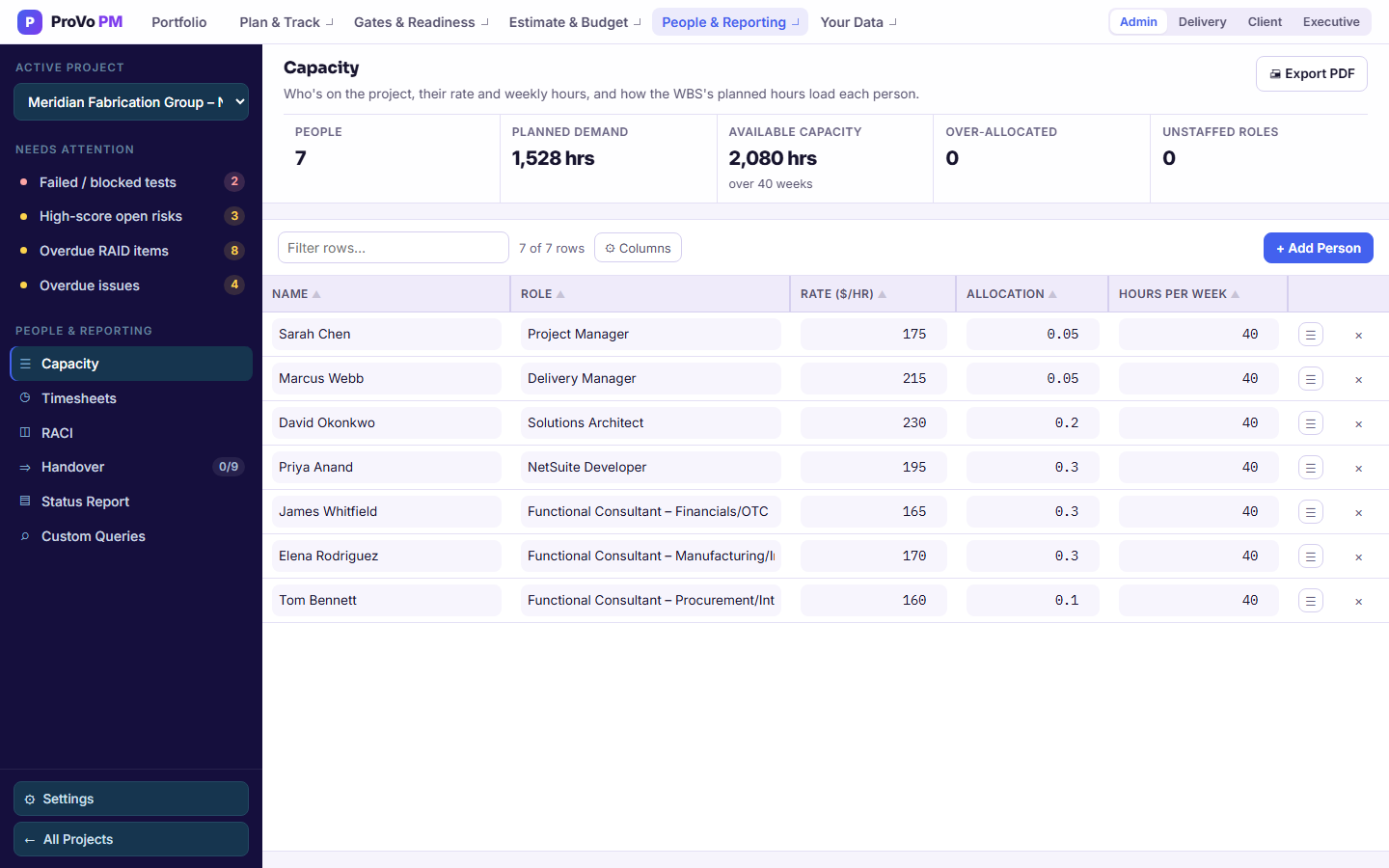
Add the people on the engagement, however many that is. Each one carries a job role, an hourly rate, hours per week and an allocation to this project. Import the list from CSV, and export the page as a PDF.
| Field | What It Means | Default |
|---|---|---|
| Role | Must match the role on WBS tasks exactly; that match is how demand finds a person | None |
| Rate ($/hr) | Their cost, used by the budget. Only roles with Financials access see it; the server removes it for everyone else | None |
| Hours per Week | Hours available in a normal week, set per person. Nothing assumes a blanket 40 | blank |
| Allocation | Share of them on this project, as a decimal. 0.5 is half their time. Left blank, capacity counts them as full time | 1.0 if blank |
| Demand Hrs | Pulled automatically from WBS tasks whose role matches theirs, split by allocation where a role is shared, or evenly if nobody sharing it has an allocation set | auto |
| Utilisation | Demand hours ÷ (hours per week × allocation × the real length of your plan). Anyone over 100% is flagged in red | auto |
Five Numbers at the Top
The Capacity page opens with people, planned demand, available capacity, how many people are over-allocated and how many roles are unstaffed. Together they answer the only staffing question that matters at kickoff: can the people we have actually do the thing we sold?
RACI
Exactly One Accountable Person per Workstream
Responsible, accountable, consulted, informed, per person, per workstream. Rows come from the WBS workstreams and columns from the people on Capacity. Click a cell to step through R, A, C and I (Shift+click steps back), export it as a PDF, and the tab checks the two rules that make a RACI worth having rather than a grid of letters.
Exactly One A
One accountable person per workstream. Not two, which means nobody, and not zero, which also means nobody. The tab flags a workstream that breaks this rather than letting it ship into a steering pack.
At Least One R
Somebody has to be doing the work. A workstream with an accountable owner and no responsible party is an area that will be discussed weekly and progressed never.
Timesheets
Logged Hours, Not Guessed Ones
The tenth tracker: one row per person, task and day. A week moves from draft to submitted to approved. Delivery logs and submits; only an admin approves a week, returns it to draft, or changes it once it is submitted.
Actual Hours Are Derived
Once any time is logged against a task, its actual hours on the WBS come from the sum of those entries, drafts included. There is no separate actual-hours field to fall out of sync with what people really logged.
Excel In, Excel Out
Download a template for a week and a person, pre-filled with their existing hours, with task and person dropdowns already built in. Fill it in, import it back, and it runs through the same preview-before-save path as every other import.
Utilisation
Measured Against Your Plan, Not a Fixed Window
Utilisation is planned hours divided by capacity across the real length of your project, summed from your own phase durations. A twelve-week engagement is measured over twelve weeks, so it does not report half its true load the way a hardcoded window would.
Someone at 118% across the plan is not busy. They are the reason the date is going to move, and you can see it in week one.
Find the Unstaffed Roles in Week One
Load your plan and your people and let the role match tell you what nobody owns.