Home/Product/Gates & Readiness
Gates & Readiness
A Scorecard That Is Allowed to Say No
Every implementation has a moment where somebody has to decide whether to switch it on. This is the part of the product that exists so that decision is made against evidence rather than optimism and a Thursday deadline.
Phase Gates
A Gate at the End of Every Phase
A gate is a row in the plan flagged as a gate, not a task with the word written in it. That distinction is the whole point: the dashboard can count how many are still open, the Portfolio shows each project's next gate, and a gate stays on the open count until someone marks it 100% complete.
Counted, Not Labelled
Open Gates is a headline number on the dashboard beside weighted percent complete. Two open gates in phase four is a sentence you can say to a steering committee.
Visible on the Timeline
Gates render as a gold diamond rather than a bar, because they take no time. They mark permission to continue.
Carries a Role
A gate is a WBS row, so it carries the role responsible for it and can be pinned to real start and finish dates when the client gives you them.
Testing Tracker
Testing That Produces a Decision, Not a Feeling
Write your scenarios once, by module. The module list offers Financials, OTC, PTP, Mfg/WMS and Cross-Module, and other module names can come in through CSV import. Each one gets an expected result written before testing starts, which is the part teams skip and then argue about.
| Field | Values |
|---|---|
| Module | Financials, OTC, PTP, Mfg/WMS, Cross-Module |
| Scenario | What the tester does |
| Expected | Written before testing starts, not after |
| Actual | What happened |
| Result | Pass · Fail · Blocked, or blank for not run |
| Severity | P1 · P2 · P3 |
| Tester | A named person |
| Status | Open, Fixed, Retest Pass, Closed |
What the Severities Mean Here
- P1: blocks go-live. No workaround. One open P1 turns the client status report red without anyone deciding to.
- P2: serious, but there is a workaround the business can live with for a short period.
- P3: minor or cosmetic. Goes on the post go-live list.
The headline counts keep them apart. Tests executed out of total, pass rate, failed, blocked and open P1 defects sit at the top of the tracker, always counted across every test rather than the filtered view, and the tracker exports to PDF.
Readiness
Your Criteria · Your Weights · Eighty Percent
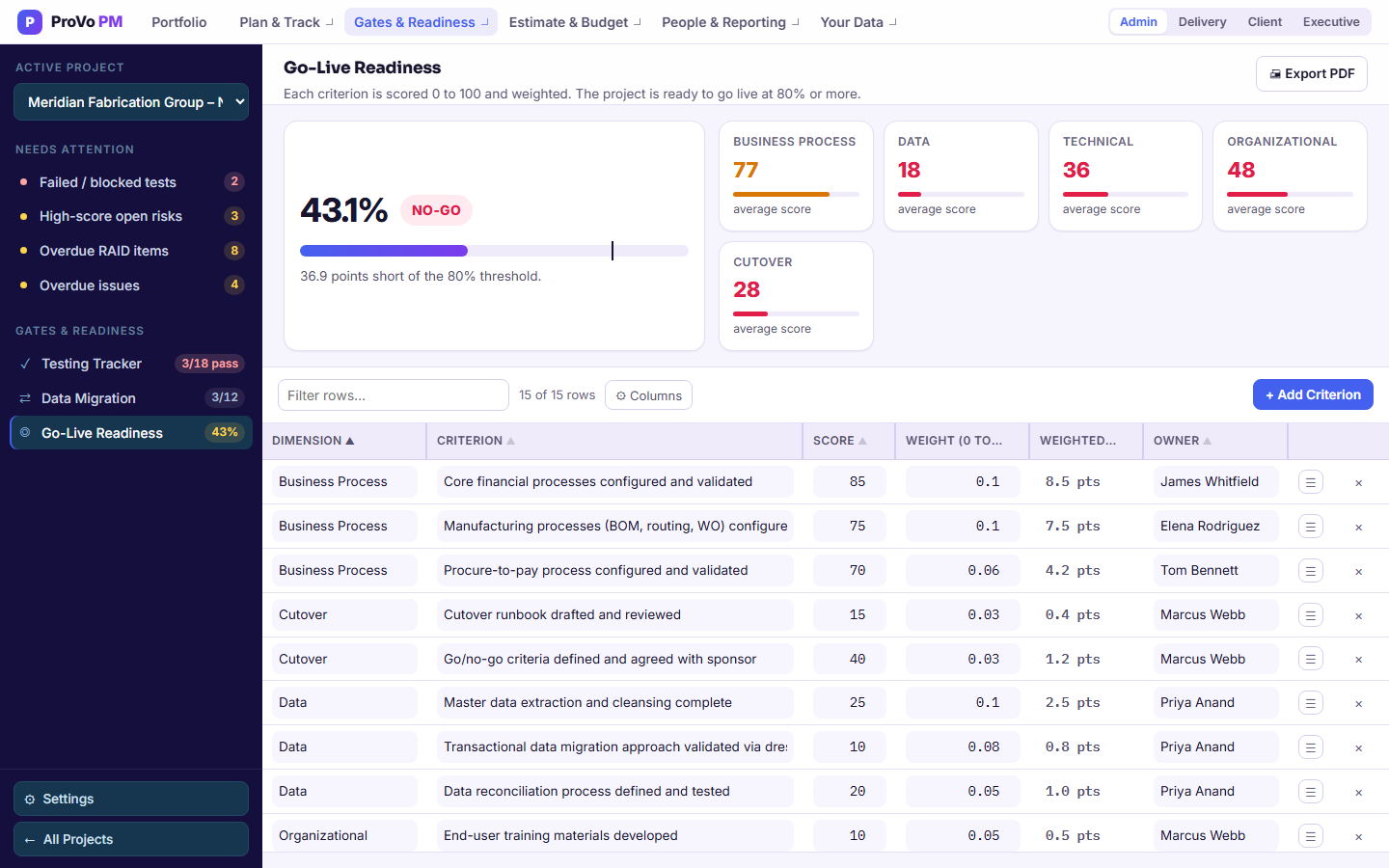
Each criterion is scored 0 to 100 and carries a weight between 0 and 1, and the weights should add up to 1.00. The weighted total is the readiness score, and 80% is the bar. The page shows a GO or NO-GO verdict and how many points short you are.
Dimensions You Name
Group criteria under whatever dimensions fit the engagement, and each one gets a tile with its average score. A common set:
- Technical: configuration complete, integrations running, environments ready.
- Data: migrated, reconciled and signed off, not merely loaded.
- Process: the business knows how the new process runs on day one.
- People: trained, with runbooks, and enough of them.
- Support: a path for when something breaks at 7am on Monday.
Weights are yours to set. Type scores and weights straight into the scorecard, or import them from CSV. If the weights do not add up to 100%, the page says so and shows the actual total, so an incomplete scorecard cannot pass for a finished one.
Score Your Next Go-Live Before You Commit to the Date
Import the scorecard weighted the way your firm weights it, and find out in week nine rather than the night before.